
Nameplate is Blue Crane Works' custom application service: it builds custom business applications for contractors and trades in Hamilton, Ontario, from a $1,995 build and $249 a month, or $0 down from $419 a month for the first year. Each company gets its own app, named for the company rather than for us, with its own logo, for quoting, job plans, crew hours, subcontractors and a customer portal, with an AI assistant built in that can plan a whole job and price it. It takes the place of tools like Jobber, Housecall Pro and CompanyCam. Paired with a website that Google, ChatGPT and Copilot can read, the two run as one system on the Run plan, from $3,995 and $449 a month. Prices in CAD, plus HST.
Verified against the live JDT Construction app and its build log
The grind
- One app for quotes, another for photos, a group chat for the crew and a spreadsheet for hours
- Per-user pricing that punishes you for hiring
- Software built for the average company, so you bend your process to fit it
- Customers phoning to ask how their job is going
- A website that has nothing to do with any of it
What does a custom application actually look like?
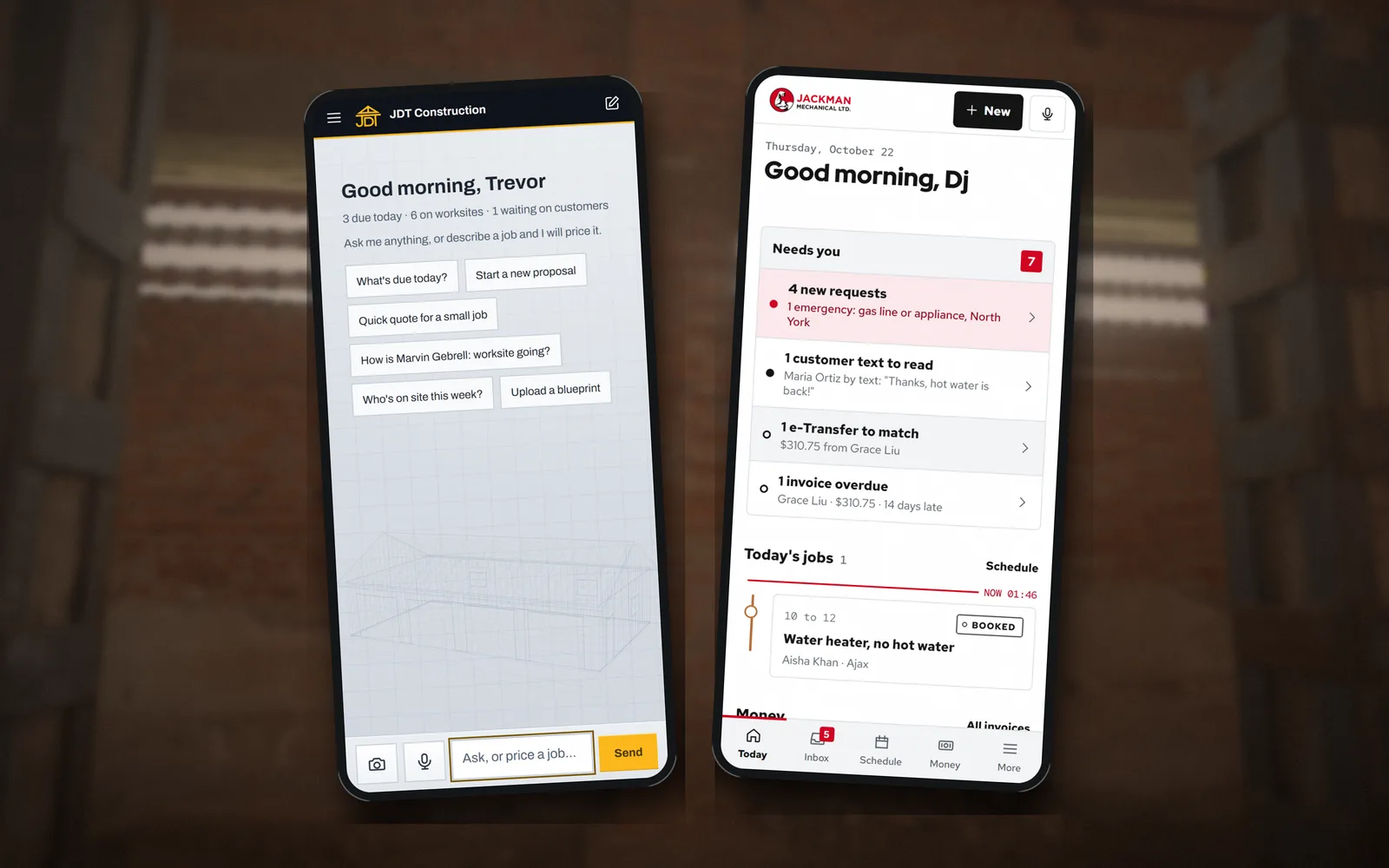
This is the app we built for JDT Construction, a general contractor, live since October 2026. The screens below come from its demo and test accounts, so every name and address in them is made up. The owner runs the business from a phone: describe a job to the assistant in plain words and it lays out the stages, days and tasks; price it and the quote goes out on the company's own letterhead; the crew clock in against the job; the customer follows the work from their own page. Jackman Mechanical runs a second Nameplate app, shaped for service calls instead of projects: requests from its website, a text line, a schedule and invoices.
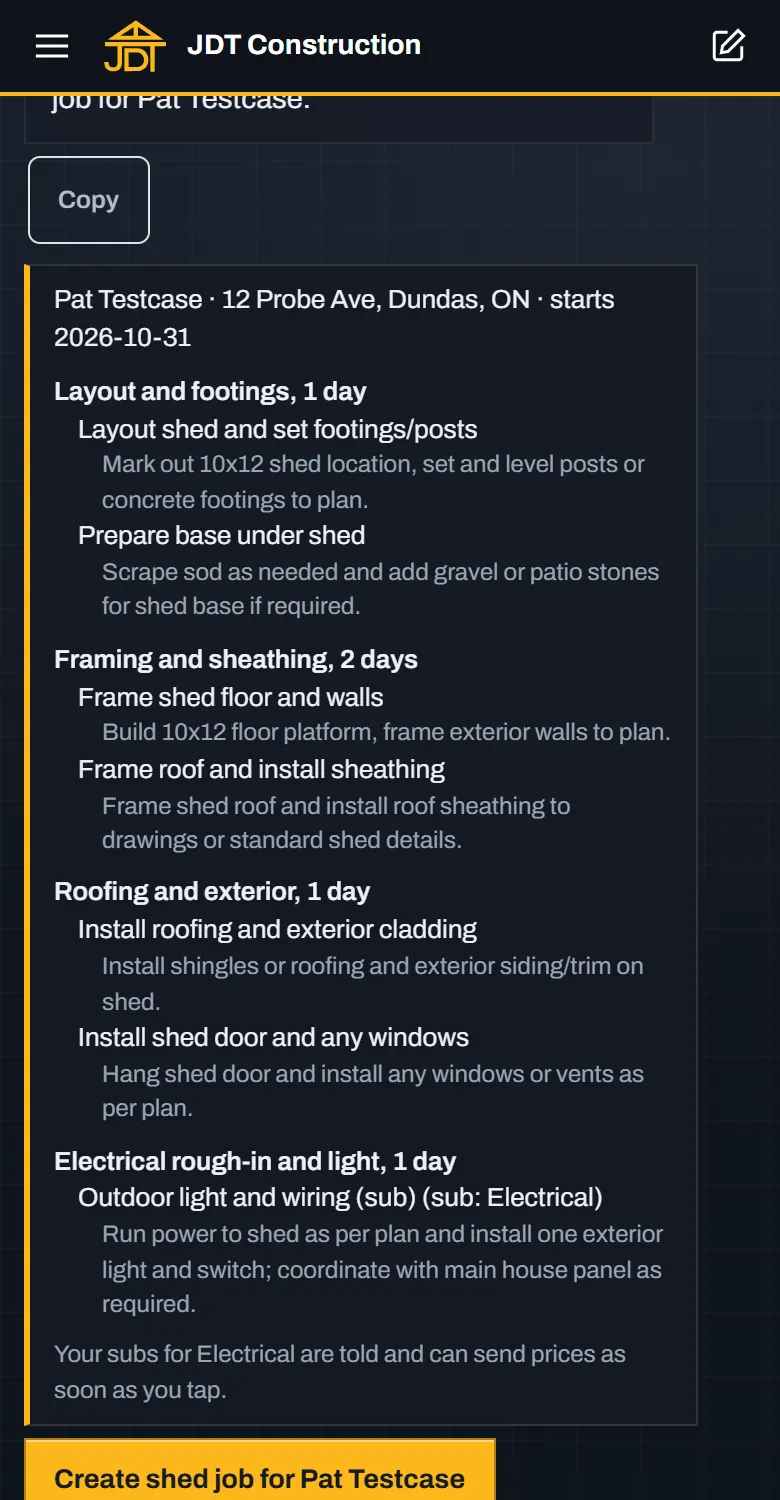
The assistant plans the jobStages, days and tasks from one sentence. Nothing changes until the owner taps.
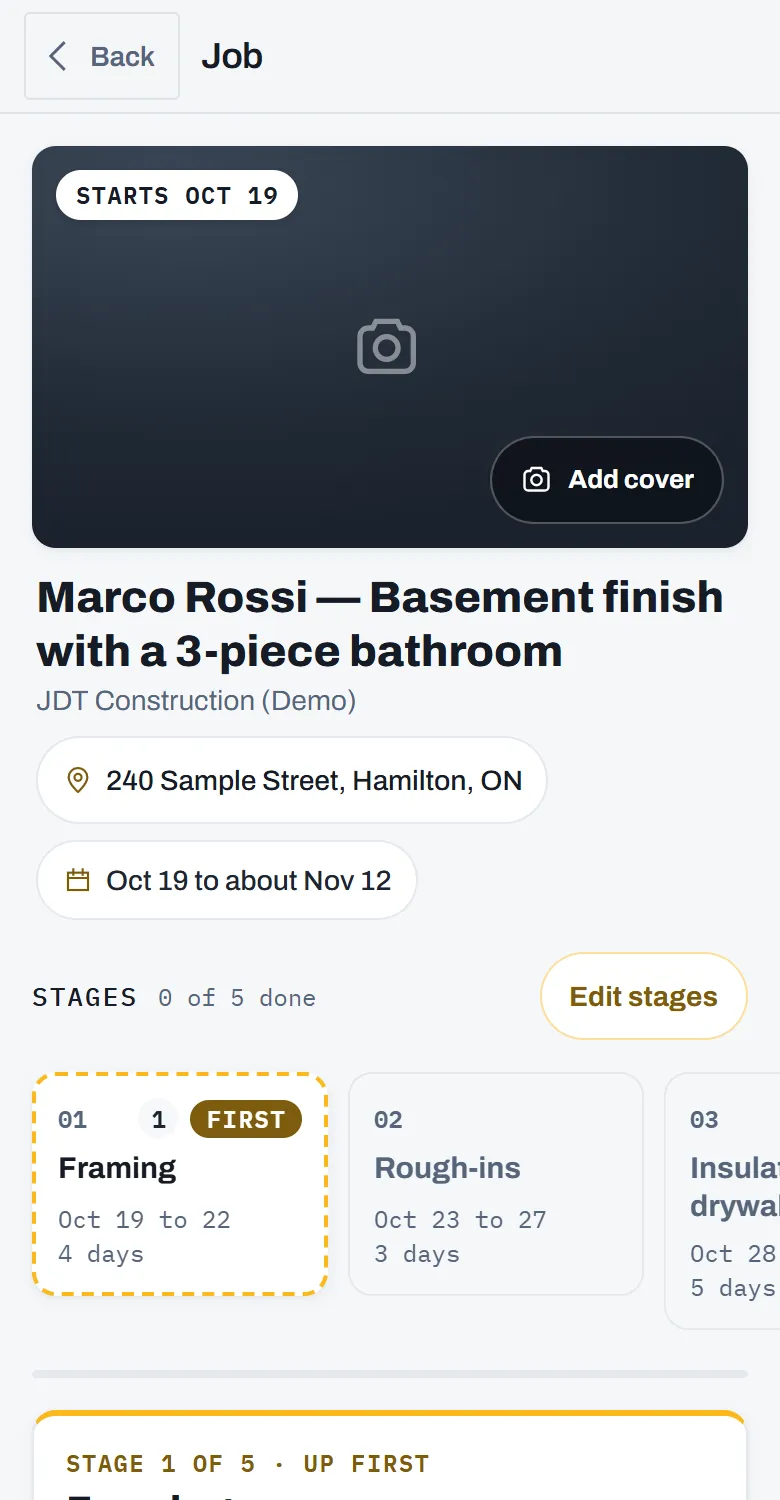
Every job, in stagesAddress, dates, stages and tasks, photos and files, all on the job.
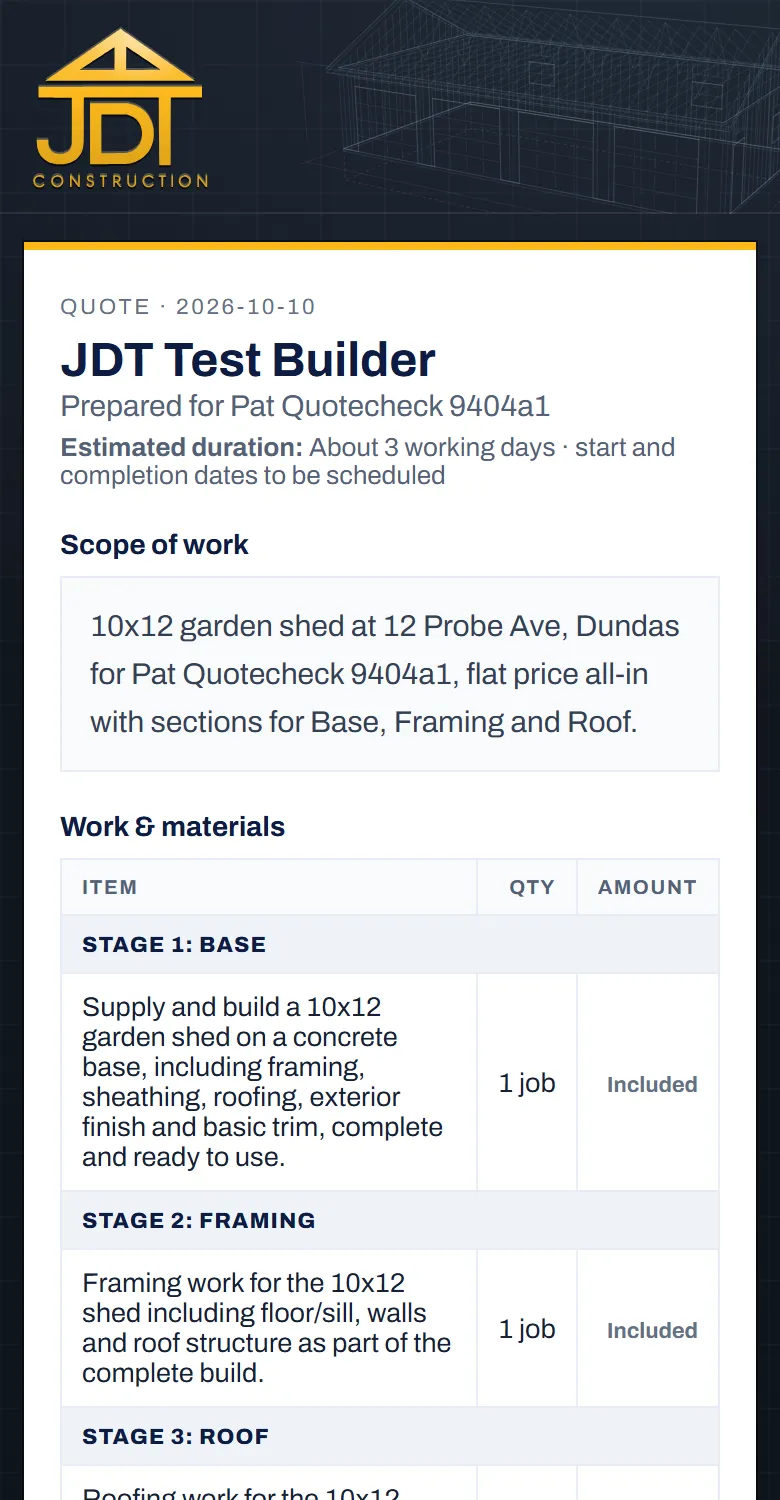
Quotes on your letterheadQuote, proposal and signed agreement, kept on the job.
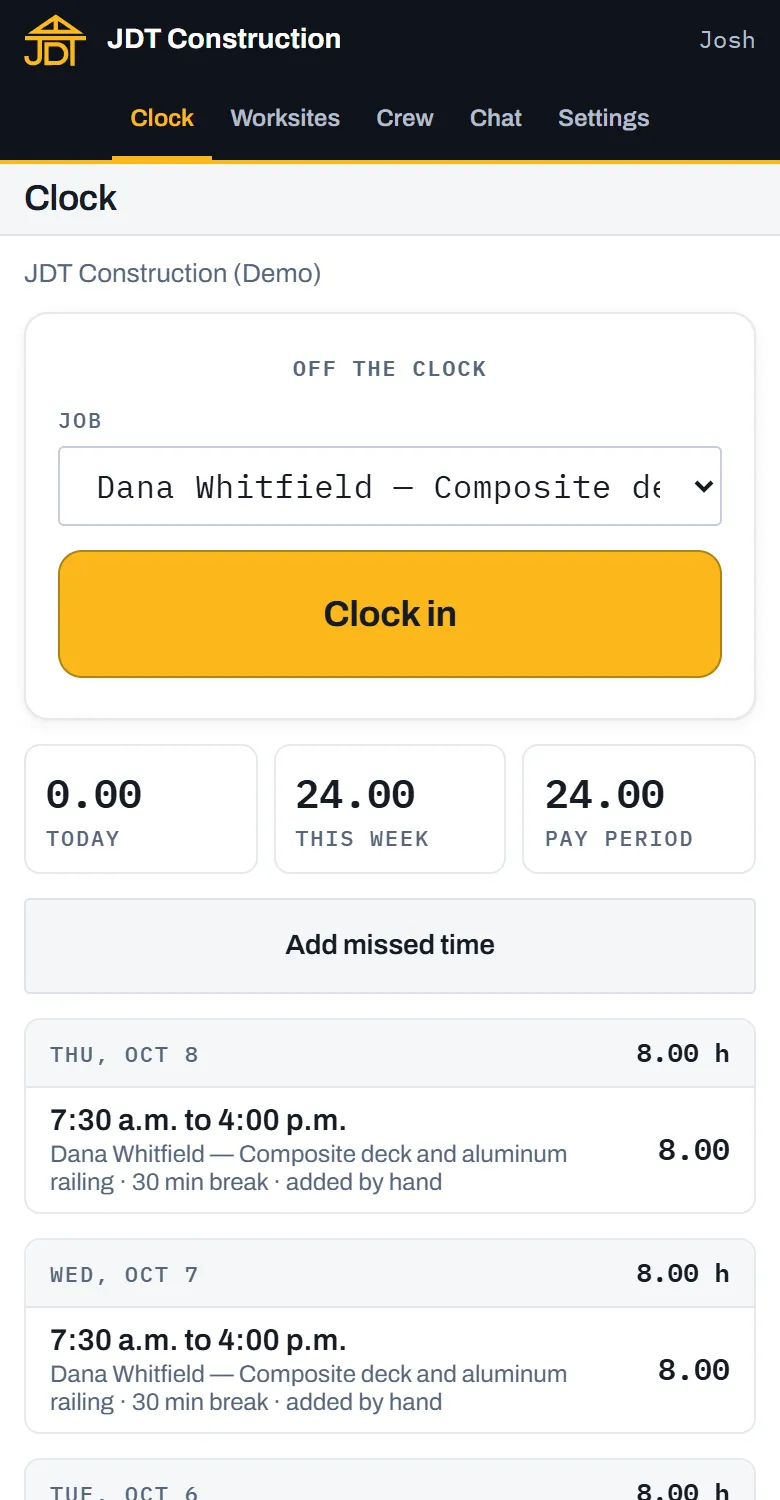
Crew hours by jobClock in and out, fix missed time with the history kept, export payroll.
What we build
Describe a job and it builds the plan; ask it to price the work and it does, from your own rates and local shelf prices; ask it to invite a crew member or change a stage and it shows exactly what it will do before you tap. Live in the JDT app.
Quote, proposal and signed agreement on your own letterhead, with your terms, your payment schedule and the signed copy filed on the job. Live in the JDT app.
Customers sign in by an emailed link and see only their own project: the stages, the photos you share, a place to ask a question or send a file. Crew see their jobs and their hours. Subcontractor companies get their own door to send sealed prices on the work you tick for their trade. Live in the JDT app.
Job plans in stages and tasks, a job folder for drawings, permits and contracts with a switch on every file for who can see it, a crew time clock with payroll export, crew chat, and a price book read from local store shelf prices. Live in the JDT app.
Text message reminders, booking and calendars, email from your own domain. Scoped in writing for your company, then added to the same monthly bill.
An AI voice agent that answers your business number, takes the message and drops every call into the app as a record on the right customer, with the transcript beside it. Live on Blue Crane's own phone line today, quoted separately. A chat agent on your website can file its enquiries in the app the same way.
Customers pay invoices online by card, into the company's own Stripe account, with receipts to both sides.
Video calls and webinars inside the app: a video visit before the truck rolls, a quote walk-through, a crew meeting. Running today on a site we run.
QuickBooks, job costing against the quote, parts and price tracking, and the website's quote form feeding straight into the app. Scoped in writing; we only call something live once it is live for a client.
What it costs
One price for the company, never per user. Every plan is a one-time build plus a monthly Care fee, with three ways to pay. Pay the build in full at signing and it is 10% less. Pay half at signing and half before launch. Or pay nothing down: one monthly price for the first twelve months, then normal Care. Care runs twelve months, then month to month, and a year of Care paid ahead is twelve months for the price of ten. On the $0 down plan, leaving inside the first twelve months makes the remaining months payable, and a site left unpaid for 30 days goes offline. Bigger builds are quoted in writing before anything is signed. All prices in Canadian dollars, plus HST.
Custom Application
from $1,995 build, then from $249 / month
Or $0 down: from $419 a month for twelve months, then from $249. Build paid in full: from $1,795.
Your company's own app.
- Built around your process
- Your name, logo and letterhead
- Quotes, job plans, crew hours and files
- Customer and subcontractor portals
- The built-in assistant
- No per-user fees
Run
from $3,995 build, then from $449 / month
Or $0 down: from $799 a month for twelve months, then from $449. Build paid in full: from $3,595.
Website and app, one system, one bill.
- A website Google, ChatGPT and Copilot can read
- Your custom application behind it
- Quarterly SEO, GEO and AI visibility update
- Hosting, domain, edits and updates handled
- Priority support, Monday to Saturday
- The person who built it answers
Bigger builds
Quoted in writing
Quoted before anything is signed, with the same three ways to pay.
When the scope is larger.
- Text messages, booking and calendars
- QuickBooks and other integrations
- Job costing and reporting
- More companies or brands
- Anything else, scoped first
Want to see it before you talk to anyone? Read the JDT Construction screens above, or book a 30-minute call and we will walk you through the live app. Existing clients keep the rate they signed.
Why a custom application instead of Jobber, Housecall Pro or CompanyCam?
Those are good products, built for a very large number of companies at once. That is the trade-off. A custom application is built for one.
| Question | Off-the-shelf field service app | Nameplate, your own app |
|---|---|---|
| Whose process? | The product's. You fit your work to its screens. | Yours. The screens follow how your company already quotes, plans and runs a job. |
| Whose name is on it? | The vendor's app, with your logo in places. | Your app: your name, logo and letterhead on every screen, quote and email body. |
| How is it priced? | Usually per plan and per user, so the bill grows as you hire. | One price for the company: from a $1,995 build and $249 a month. No per-user fees for your crew, subs or customers. |
| Photos, chat, hours? | Often a second or third subscription. | In the same app, on the same job. |
| The website? | A separate company and a separate bill. | Optional, and built to work with the app: the Run plan, from $3,995 and $449 a month for both. |
| Who do you call? | A support line. | The person who built it. |
When is off-the-shelf the better pick? When you work alone, the standard flow suits you, and you would rather sign up today than have an app built around you. When you do want one built, it is scoped in writing around how your company already quotes, plans and runs a job.
What can be added to a Nameplate app?
Two products of ours plug straight in. Nameplate Pay lets your customers pay your invoices online by card, into your own Stripe account, with the receipt sent for you; it is running in Jackman Mechanical's app. Nameplate Live puts video calls and webinars inside the app, so a customer can show you the problem before you drive out; the same rooms run today on a website we built and run. The AI agents that answer your phone, texts and website chat file what they hear in the app too.
One system: the website and the application together
Most customers come in through one door and end up using both. A managed website brings the enquiry in, built so Google, ChatGPT and Copilot can read it and quote its facts. The application runs everything after: the quote, the plan, the crew, the subs, the customer's own page. On the Run plan, from a $3,995 build and $449 a month, or $0 down from $799 a month for the first year, we build and run both, as one system, on one bill. Add the AI agents and the phone and the website chat join them: every call the voice agent answers lands in the app, and the chat agent can send its enquiries there too. Nobody can promise that an assistant will name your business; what we promise is the work, and that every condition the engines publish for being read is met.
Where does my data live?
Your application runs on Microsoft Azure, on infrastructure we operate. Its records sit in Microsoft's cloud in the United States (the East US 2 region), and they are governed by Canadian privacy law, PIPEDA. The full picture, service by service, is on our data page.
What it replaces
- Jobber or Housecall Pro for quotes and scheduling
- CompanyCam for job photos
- A group chat for the crew and a spreadsheet for hours
- Customers phoning to ask how the job is going
Who it is for
Contractors and trades with a crew, subcontractors and customers who want to know how their job is going: general contractors, renovators, deck, fence and landscaping companies, mechanical and electrical shops. On site across Hamilton, Stoney Creek, Ancaster, Dundas, Waterdown, Burlington, Grimsby and Brantford, and remotely anywhere in Ontario.
What week one looks like
- A call with you, then a morning with the people who do the work, mapping how a job actually moves from the first call to the last invoice.
- You get a written scope: the screens, who sees what, what it replaces, the build price and the monthly Care, and the three ways to pay.
- We build on the parts already proven in a live contractor's app, then shape them to your process, so you see working screens early and often.
- Your crew, your subs and your customers get their own doors, and you keep calling the person who built it.